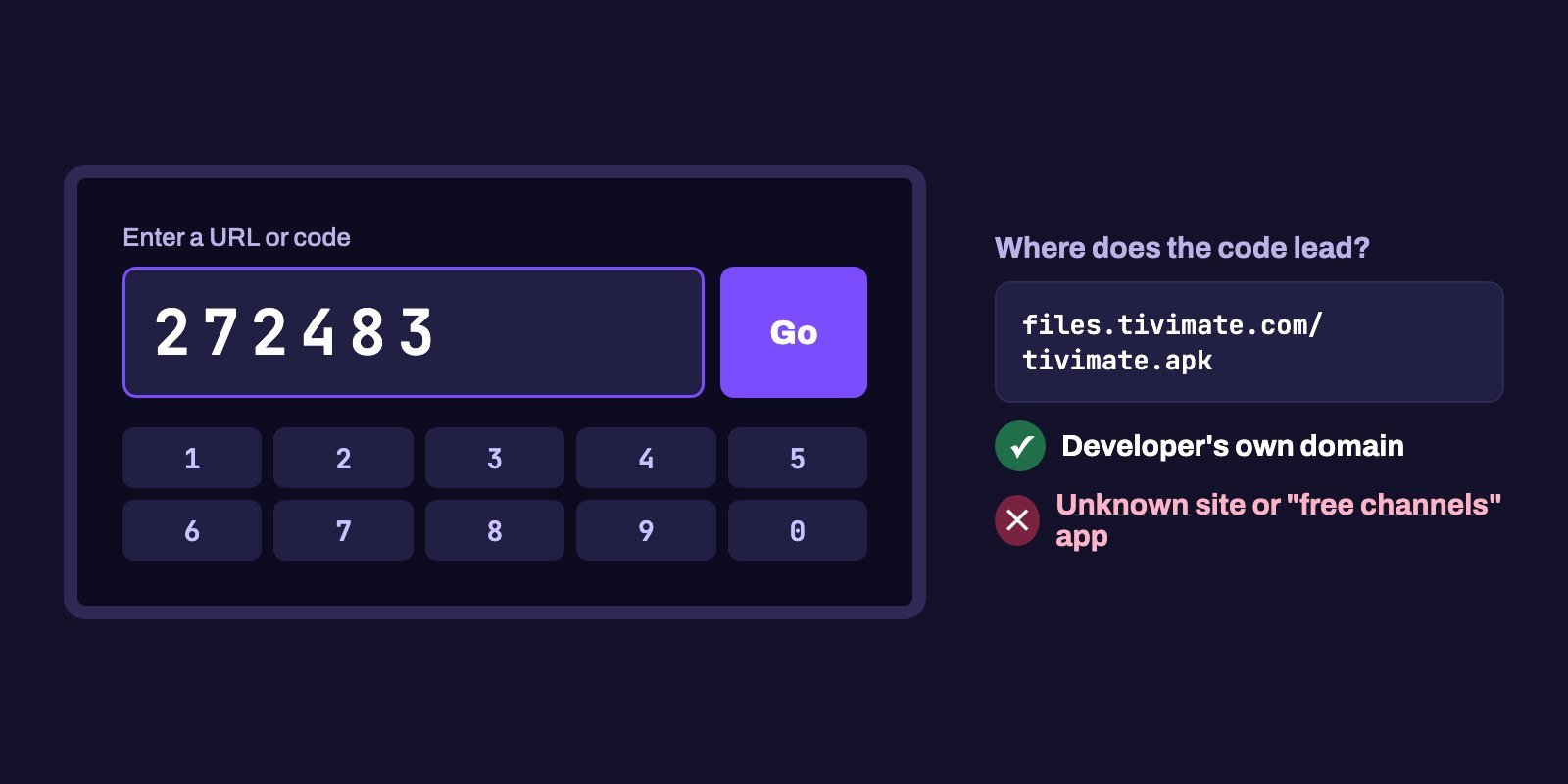
The official Downloader code for TiviMate is 272483. IPTV Smarters Pro, Smart IPTV and IBO Player publish a short address instead: getiptvsmarters.com, apk.siptv.app and iboiptv.com. Type the code or address into the Downloader app on a Fire TV or Android TV and it fetches the installer for you.
One rule matters more than any list. Only trust a code that the developer publishes on its own website, because anyone can create a Downloader code for any link, and that makes the long "free IPTV codes" lists shared online a gamble. And a code only installs a player. It never brings channels with it.
Note: Smart IPTV App is an IPTV provider, and we promote our own service on this page. The apps and devices mentioned here are made by independent companies.
Last checked: October 7, 2026. Every code and address below was tested against the developer's own site (tivimate.com, siptv.app, getiptvsmarters.com, iboiptv.com, kodi.tv, videolan.org). Code rules come from the AFTVnews URL shortener FAQ.
What a Downloader code actually is
Downloader is a free app from AFTVnews that opens web addresses on Fire TV and Android TV devices. Typing a full address with a remote is slow, so AFTVnews also runs a URL shortener: you give it any address and get back a short number, such as 12345, along with a link like aftv.news/12345. Type that number in Downloader and it opens the original address.
Its own FAQ explains why codes deserve a second look. Four reasons stand out. Anyone can create one. Nothing checks that the person behind a code is the app's developer. A code can never be edited, so when a developer moves a file, the old code just breaks. AFTVnews also switches codes off after copyright complaints, abuse or breaches of its terms, which is why long "free codes" lists go stale so fast. And because codes are only digits, anyone can type random numbers and see where they lead.
A code, then, is exactly as trustworthy as the address behind it. Below you will find the official ones, and a way to check any other code in half a minute.
Official Downloader codes and addresses for IPTV players
TiviMate is the only developer that publishes a numeric Downloader code on its own site, while the others give a short address instead, which goes in the same field in Downloader and does the same job.
| Player | Type in Downloader | Published by | Cost |
|---|---|---|---|
| TiviMate | 272483 or tivimate.com/apk | tivimate.com | Free, paid premium features |
| Smart IPTV | apk.siptv.app | siptv.app | One-time activation, 5.49 EUR per device |
| IPTV Smarters Pro | getiptvsmarters.com/download, then Android TV | getiptvsmarters.com | Free |
| IBO Player | iboiptv.com, then Downloads | iboiptv.com | 7-day trial, then paid license |
| Kodi | kodi.tv/download/android | kodi.tv | Free, open source |
| VLC | get.videolan.org/vlc-android | videolan.org | Free, open source |
We tested each one on October 7, 2026. TiviMate's code 272483 led to files.tivimate.com/tivimate.apk, the same file you get from tivimate.com/apk, and the developer says this direct version "has fewer restrictions and checks for updates".
For Smart IPTV, the developer's Android page gives apk.siptv.app for manual installs on Android, Google and Fire TV devices, and Android TV owners can also get the app from Google Play. Because Smart IPTV ties its activation to the device's MAC address, the same page asks Android 10, 11 and 12 users to pick "Use Device MAC" in their Wi-Fi privacy settings, otherwise the address changes after each reconnection.
The Smarters download page lists the Android TV version 5.0 (74 MB) with its SHA-256 checksum, and the developer says this is the only place it distributes the app. IBO Player needs one extra step: open iboiptv.com in Downloader's browser, accept the site's terms, then pick the Android download from the Downloads page.
Kodi's Android page offers a 32-bit (ARMV7A) and a 64-bit (ARMV8A) file, and the Kodi wiki has a Fire TV installation guide that walks through the Downloader method. VideoLAN keeps the VLC APK in a folder per version on its download server.
Not sure which player suits you? We weigh the strengths and limits of each in our Firestick player comparison.
How to check any Downloader code before you install
Someone in a group chat sends you a code that is not in the table above. Check where it goes first. It takes about 30 seconds on a phone:
- Open your phone's browser and go to aftv.news/ followed by the code, for example
aftv.news/272483. - The page shows "Redirecting in 3 seconds to:" followed by the full destination address. Tap the page to pause the redirect if you need more time to read it.
- Now look at the domain, the part just before the first single slash, because that is the only part of the address that tells you who actually hosts the file you are about to install. For TiviMate it is
files.tivimate.com, which belongs to the developer.
If that domain is the developer's own, the one you would reach by searching for the app's official site, go ahead. If the address points to a file-sharing site, another link shortener or a blog you have never heard of, or if the app's name promises "free channels", "free movies" or a "premium unlocked" version of a paid player, leave it.
How to use a code in Downloader, step by step
These steps work on Fire OS devices and on Android TV. Our Firestick installation guide goes into more detail on each one.
- Check your device first. According to AFTVnews, the third-generation Fire TV Stick 4K, the Fire TV Stick 4K Select and the 2nd-gen Fire TV Stick HD run Vega OS, which supports neither Downloader nor apps from outside the store. No code will work on them.
- Install Downloader from your device's app store. Search for "Downloader" and pick the app published by AFTVnews.
- Give it permission to install apps. On a Fire TV that is Settings > My Fire TV > Developer Options > Install unknown apps, where you switch Downloader on.
- Open Downloader, select the address field, type the code or address and select Go.
- When the download finishes, select Install, then Done. Downloader then offers to delete the installation file. Say yes. Storage on sticks is tight.
- Open the new player and add your IPTV login, either Xtream Codes details or an M3U link from your provider.
If the download starts but the install fails, or nothing happens after Go, our guide on IPTV not working covers the usual causes.
Using codes on Android TV and Google TV
Downloader is not limited to Fire TV. It is on Google Play for Android TV and Google TV devices too, and the same codes and addresses work there.
On those devices, look in the store before reaching for a code. Several players are on Google Play, TiviMate and Smart IPTV among them, and store versions update themselves. Downloader is the fallback for devices where the store version is missing.
You will also find the permission in a different menu. Instead of Developer Options, Android TV and Google TV usually keep it under Settings > Apps > Security & restrictions > Unknown sources, where you switch Downloader on. Menu names differ by brand.
Smart TVs that do not run Android, such as Samsung (Tizen) and LG (webOS) models, cannot use Downloader at all. On those, install players from the TV's own app store.
When a code stops working
A code that worked last month can fail today. There are four usual causes. A typo comes first: one wrong digit sends you to a completely different address, possibly someone else's file, so compare the number with its source. A dead code is next, and you can confirm it by looking it up at aftv.news followed by the number.
Files also move. Codes created by third parties are never updated when a developer reorganizes its downloads, while the developer's own download page is. The official address from the table above gets around this. Last, check the device itself: on a Vega OS Fire TV, Downloader does not exist, so no code can work.
Once a player is installed, keep it current through the developer rather than by hunting for new codes. The TiviMate direct version checks for updates on its own, and Smart IPTV's Android page says the sideloaded app updates from its own Settings, under Application Update. For IPTV Smarters Pro, the version number on the official download page tells you when a new file is out.
Why "free IPTV Downloader codes" lists are a bad idea
Search for free Downloader codes and you will find long lists on social media and small websites. Most of them slip a few real player codes in among codes for apps that promise free channels, films and sports. Those apps rarely come from a developer you could identify or contact, they almost never publish checksums, and they can change overnight. Installing one means running software you cannot verify on a device connected to your home network, next to your phones, your computers and every login you have saved on them.
They also do not last. AFTVnews disables codes after copyright complaints, and the apps tend to vanish when their servers are taken down, so a list from last month is often half dead. The "premium unlocked" players on those lists are no better: they are copies changed by someone other than the developer, with no official updates and unknown contents.
And none of it gets you channels. Even the official codes install an empty player. TiviMate, Smarters, IBO and Smart IPTV all state that they provide no content, so you still need a subscription. An official player from its developer, plus a provider you can actually contact, is the combination that keeps working.
"IPTV code" can mean four different things
People searching for an IPTV code are often after something other than a Downloader number. The four kinds of code do very different jobs:
| Code | What it does | Where it comes from |
|---|---|---|
| Downloader code | Installs an app from a web address | The app's developer, or anyone using the AFTVnews shortener |
| Activation code or license | Activates a paid player on one device | The player's developer (for example Smart IPTV's one-time activation, or IBO Player's license) |
| IPTV login | Gives the player access to channels | Your IPTV provider: Xtream Codes details or an M3U link |
| Parental PIN | Locks adult or selected categories | You set it in the player's parental control settings |
No activation code, free or paid, turns an app into a working IPTV service. It activates the player, and the channels still come from a subscription. Smart IPTV's activation page is blunt about it: no channels are provided with activation.
After the code: getting channels into your player
A freshly installed player needs a login before it shows anything. Smart IPTV App sends Xtream Codes details or an M3U link on WhatsApp or by email within 5 to 15 minutes of payment, and they work in every player in the table above. Each plan covers 1 to 4 devices at the same time.
To see how your device and player handle the service before paying, start with the 24-hour IPTV free trial. If you went with IPTV Smarters Pro, our IPTV Smarters Pro subscription page walks through the setup, and every plan is listed on the IPTV subscription page.
Frequently asked questions
What is the Downloader code for TiviMate?
272483. The official TiviMate site gives this code, along with the address tivimate.com/apk. On October 7, 2026 the code led to files.tivimate.com/tivimate.apk.
What is the Downloader code for IPTV Smarters Pro?
The developer does not publish a numeric code. Type getiptvsmarters.com/download in Downloader and choose the Android TV version, which the developer says is only distributed through its own site.
What are the best Downloader codes for Firestick?
The ones published by the app developers themselves, such as 272483 for TiviMate, or the official addresses apk.siptv.app, getiptvsmarters.com and kodi.tv/download/android. Check any other code at aftv.news followed by the number before installing.
Are free IPTV Downloader codes safe?
Codes for apps that promise free channels or unlocked paid players come from unknown sources, stop working often and can contain anything. AFTVnews also disables codes after copyright complaints.
How can I get an IPTV code?
It depends on the code. A Downloader code installs a player, an activation code unlocks a paid player, and an IPTV login (Xtream Codes or M3U) comes from your IPTV provider when you subscribe or start a trial.
Is there a free IPTV activation code?
No. Activation codes activate a player on one device; they never include channels. Smart IPTV, for example, charges a one-time 5.49 EUR activation per device and states that no channels come with it.
Why does my Downloader code not work?
The code may have been disabled, the file may have moved, or your stick may run Vega OS, which does not support Downloader. Check the code at aftv.news followed by the number, and check your Fire TV model.
Why is my TiviMate Downloader code not working?
Check the digits first, then look up aftv.news/272483 on a phone to see where the code leads. If your stick runs Vega OS, such as the Fire TV Stick 4K Select, Downloader is not available at all. You can also type tivimate.com/apk instead of the code.